Capacity
Know what you are storing, and for how long
Files, student attachments, and brochures share one allowance. The limits are here so the assistant stays within what you have chosen to keep, and so a student’s documents are not treated as spare training material.
- Where to go
- Subscription → usage meters
- Who can do this
- Organization members can inspect usage; admins manage the subscription
The three storage categories
| Category | Purpose | How to use it |
|---|---|---|
| Training data storage | Institute documents the assistant may use to answer questions. | Upload them in Training Data and train the source. The original file uses storage. The extracted knowledge also counts toward source slots and tokens. |
| Visitor-uploaded storage | Images or documents a student attaches during a chat. | These belong to that conversation so a person can review them. They share the institute’s file allowance. They are not permission to train on someone’s private upload. |
| Bot-servable resource files | Approved files the assistant may hand to a student, such as a brochure or an application pack. | Upload the file for the right bot, give it a clear title, and test that the download is the version you meant. These use storage. They are not the same as sources used for answers. |
Uploaded files share one organization allowance
Uploaded files and Shared file storage on Subscription count training files, visitor attachments, and resource files across every bot. Each upload takes one slot and its size. An upload still in progress reserves that space. A link does not.
With a 100 MB allowance, 70 MB of training files, 20 MB of attachments, and 5 MB of brochures leave about 5 MB. Another bot or another teammate does not add to that number.
Storage is bytes. Active knowledge is the extracted text, measured in tokens. A small file can hold a lot of words, so free storage does not mean a large training batch will fit.
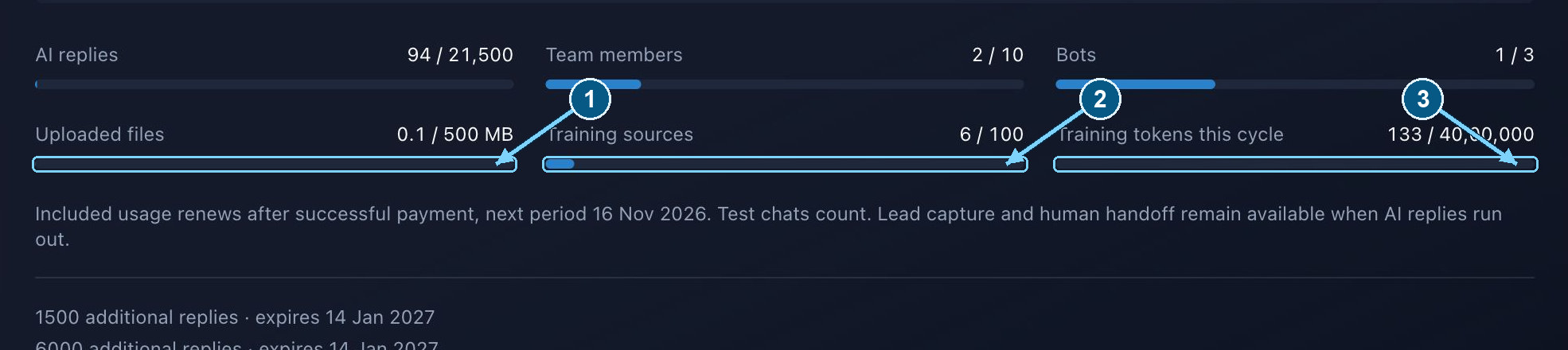
Uploaded files is shared capacity. Sources and training tokens are separate checks.
Enlarge- Shared uploaded-file storage
- File and URL source count
- Training work this cycle
Standard plan limits
These are the standard allowances. Your Subscription page is the one that applies to this organization, including anything arranged for the account. In these plans, 1 MB means 1,000,000 bytes.
You can select up to 10 training files at once, each under the 10 MB limit shown on the upload screen. The screen’s limit and the plan’s per-file ceiling both apply. Use the smaller one.
The widget has its own 5 MB cap for a visitor attachment, shown as 5 MB. The server still checks the plan’s per-file ceiling and the storage you have left.
| Allowance | Trial | Starter | Growth |
|---|---|---|---|
| Uploaded files — shared count | 5 | 20 | 100 |
| File storage — shared total | 20 MB | 100 MB | 500 MB |
| Plan ceiling per file | 10 MB | 10 MB | 25 MB |
| Training sources — files plus URLs | 5 | 20 | 100 |
| Active trained content — tokens | 50,000 | 5,00,000 | 20,00,000 |
| Training work per cycle — tokens | 1,00,000 | 10,00,000 | 40,00,000 |
Visitor attachments: formats and expectations
The paperclip accepts PDF, DOCX, TXT, JPG, JPEG, PNG, GIF, and WebP, one file at a time, under the 5 MB shown in the widget. Use a normal lowercase extension.
The visitor needs a real chat session. The paperclip is unavailable while the contact form is open. Finish the form first. If that conversation already has a file with the same name, rename it and try again.
An upload is there for a person to review. It does not train the assistant, and it does not mean the assistant has read or understood the file. Treat what a student shares with the care you would want for your own documents.
Give visitors the right downloadable resource
Resource files use shared upload slots and storage. Links do not. Source counts and training tokens apply only when you train content. Keep the approved originals, and a copy of each version you published, somewhere you control.
- 1
Select the organization and bot
Work on the bot that should share the file. Check remaining storage and the size limit before you upload.
- 2
Prepare a visitor-ready file
Use a clear name and a document you are happy for a student to keep. Include the programme, intake, and revision date when they matter. Take out internal comments, private records, and old fees.
- 3
Upload and describe the resource
Give it a short title and say when it helps, such as the prospectus for one programme. Keep separate files when the campus, intake, or audience is meaningfully different.
- 4
Test the visitor journey
In a fresh chat, ask for the file, open it, and check the version. Replace a superseded file promptly. Remove anything students should no longer receive.
Context-aware resource sharing
A short description tells the assistant when a file or link would help. It can offer an admissions guide in the middle of a relevant chat, wait for a yes, and then share one small card. The offer is a courtesy, not a promotion.
Free the capacity that is actually full
| Limit reached | Useful action |
|---|---|
| Uploaded file count | Delete obsolete file resources or training files, or upgrade to a plan with more file slots. Pausing a resource does not release its file. Resource links remain available. |
| Uploaded bytes | Remove obsolete training files and bot resources when safe. Conversation attachments remain until the product’s removal or retention cleanup removes them. Export records you need before retention runs. |
| Source count | Remove obsolete files or URL sources. Each active URL consumes a source slot even without a large uploaded file. |
| Active trained-content tokens | Remove stale knowledge or simplify repetitive material. Deleting the source can free its active corpus allocation after cleanup. |
| Training tokens this cycle | Wait for the next successful billing cycle or choose a suitable plan. Deleting content does not undo training work already consumed. |
| Single-file size | Export a cleaner copy, split by topic, or compress oversized images inside a document. Total free storage does not override the per-file cap. |
Retention and export
Retention is separate from how full your storage is. Older conversations and their attachments can be removed on a schedule. Do not treat the chatbot as the only copy of a student’s record.
Cleanup warns the organization at least seven days before eligible records go. Trial records, and records after a long lapse in the subscription, have extra expiry cleanup. There is a 30-day window after expiry before broader removal, and the warning still applies.
Use Subscription → Export records before a deadline, and store the export somewhere secure. An export is not a substitute for the original training files, or for attachments you still need.
| Allowance | Trial | Starter | Growth |
|---|---|---|---|
| Conversation transcripts | 30 days | 90 days | 180 days |
| Lead records | 30 days | 365 days | 365 days |