Subscription management
Pay for the capacity your students actually need
Plans, replies, payments, and renewals live here. Choose capacity so the assistant can keep answering. Do not treat a bigger plan as a reason to say more than you know.
- Where to go
- Subscription; Manage billing & invoices
- Who can do this
- Members can review usage; organization admins manage billing and export
Read your organization’s subscription
Open Subscription in the sidebar. Read the organization, the plan, the status, the access or renewal date, any checkout still pending, and the usage meters. An old receipt, or a key that still looks active, is not proof that the subscription is current.
A sandbox banner means this application is using test billing. Those receipts and sample invoices are practice documents. They are not evidence that a real charge happened.
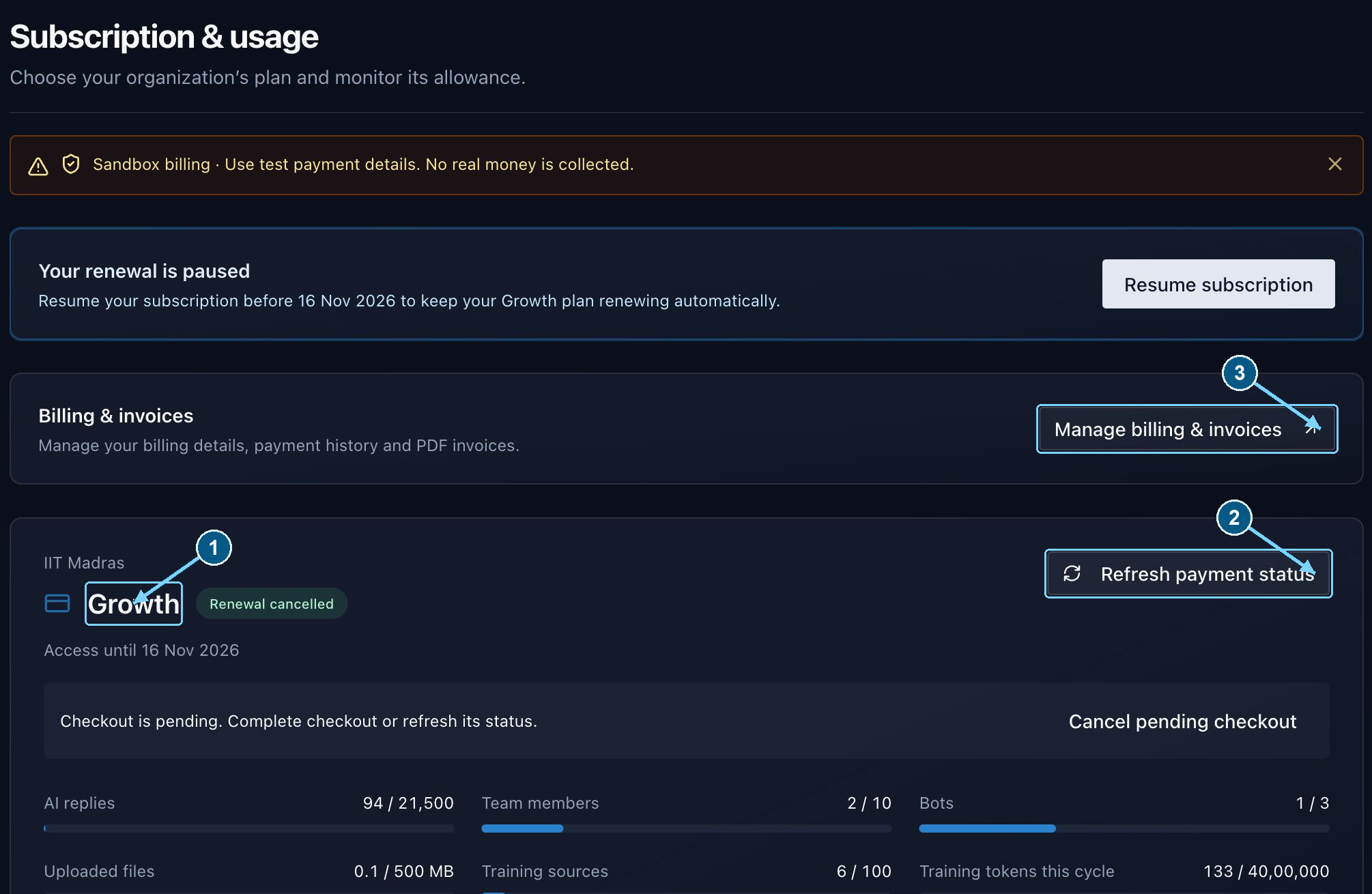
Check status and remaining capacity here before repeating a checkout. Captured amounts and dates are examples.
Enlarge- Check the subscription status
- Refresh a pending payment
- Open billing and invoices
Standard plans and team limits
An eligible account receives one 14-day Trial. That eligibility is used once. Another organization does not start it again.
Starter is ₹1,999.00 per month and Growth is ₹4,999.00 per month, plus applicable tax. Checkout shows the actual subtotal, tax, and total. Do not infer tax treatment from a sample screenshot.
| Allowance | Trial | Starter | Growth |
|---|---|---|---|
| Included AI replies per cycle | 100 | 1,000 | 4,000 |
| Team members, including admins | 1 | 3 | 10 |
| Bots | 1 | 1 | 3 |
| Shared uploaded-file storage | 20 MB | 100 MB | 500 MB |
| Training sources | 5 | 20 | 100 |
What consumes an allowance?
- A test chat uses AI replies too. A completed assistant response spends the allowance. A message written by a person is a different path.
- Included replies and training belong to the billing period. They renew after a successful payment. A new calendar month, by itself, does not refill them.
- Extra reply packs are used after the included replies, soonest expiry first. A pack adds replies only. It does not add seats, bots, storage, sources, or training room.
- Training tokens measure work done in this cycle. Active corpus tokens measure knowledge you are keeping now. They are different limits, and running out of one does not mean the other is full.
- Active members and eligible invitations that are still waiting both count toward seats. The list of people you can see may be shorter than the seats already reserved.
Start a paid subscription
- 1
Check the organization and billing details
Open Manage billing & invoices. Enter the billing name, email, Indian phone number, address, and state. GSTIN is optional. Save and read the details back before you pay.
- 2
Choose your capacity
Return to Subscription and pick the paid plan that fits the work. Read the confirmation, the price, the tax, and the recurring terms. The checkout total is the one that matters.
- 3
Complete the provider’s checkout
The account owner should review and finish the payment. Coming back to the dashboard is not the same as paying.
- 4
Wait for verified status
Check the plan and the access date that appear. If checkout is still pending, use Refresh payment status. Do not start a second payment while the first one is unresolved.
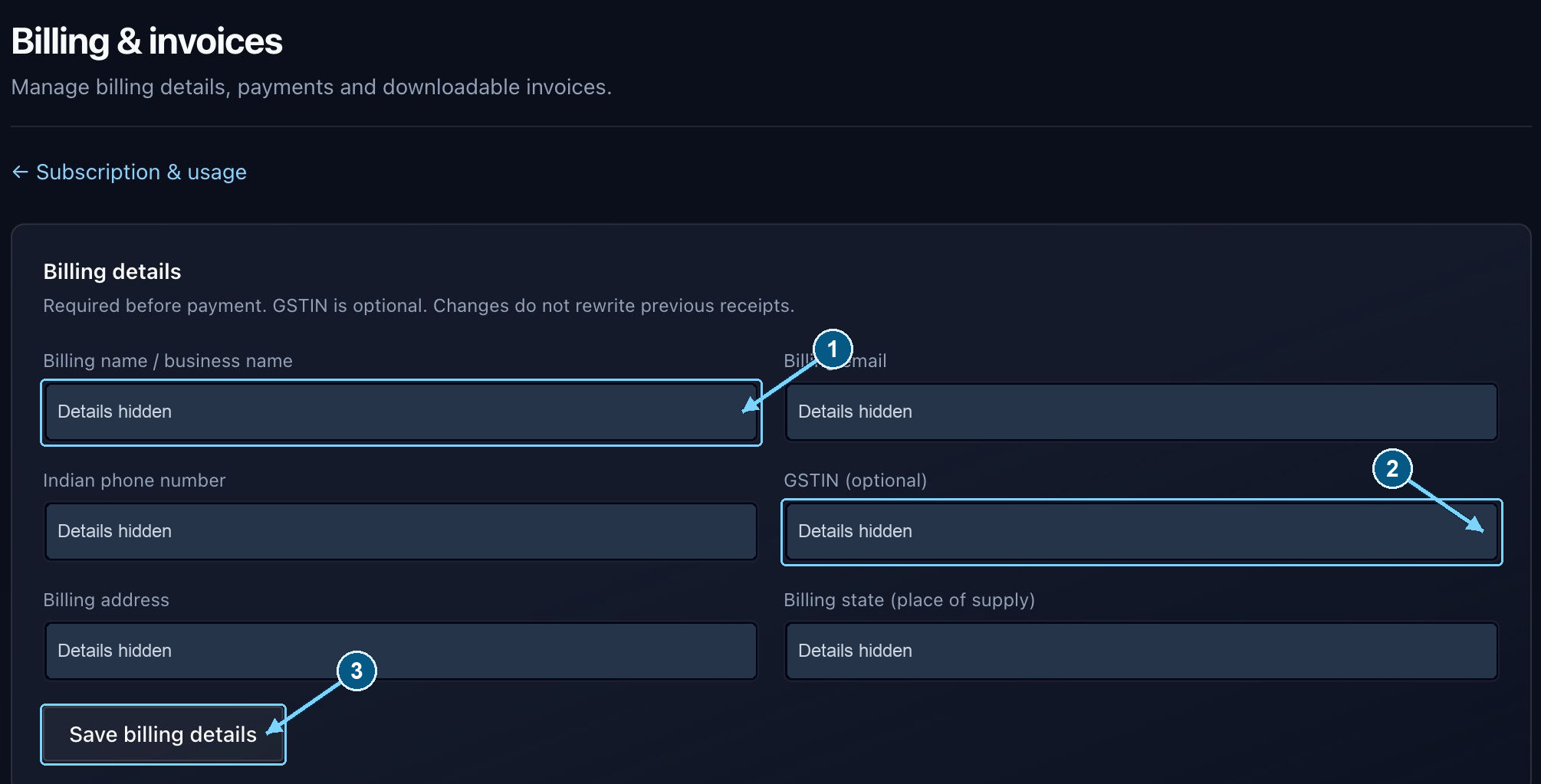
Complete the billing form before checkout. Updating it does not rewrite earlier receipts.
Enlarge- Required billing identity
- GSTIN is optional
- Save before checkout
Renewals, upgrades, and downgrades
Changing an active recurring plan schedules the new plan for the next collection. The new limits arrive only after that payment succeeds. Choosing Growth is a plan for later, not extra room today.
The service blocks a renewal-plan change in the last two days before collection, because the payment is already being prepared. Follow the message on screen. Wait for renewal, or contact support.
Before you schedule a smaller plan, reduce bots, seats (including invitations still waiting), stored bytes, sources, active knowledge, and any file that is too large. A pending smaller plan can also stop new additions before it starts.
Cancel renewal stops the next charge and keeps access until the paid-through date you can see. That is different from abandoning a checkout you have not finished. If renewal is already cancelled, use Resume subscription or Resume renewal and complete any authorization the provider asks for.
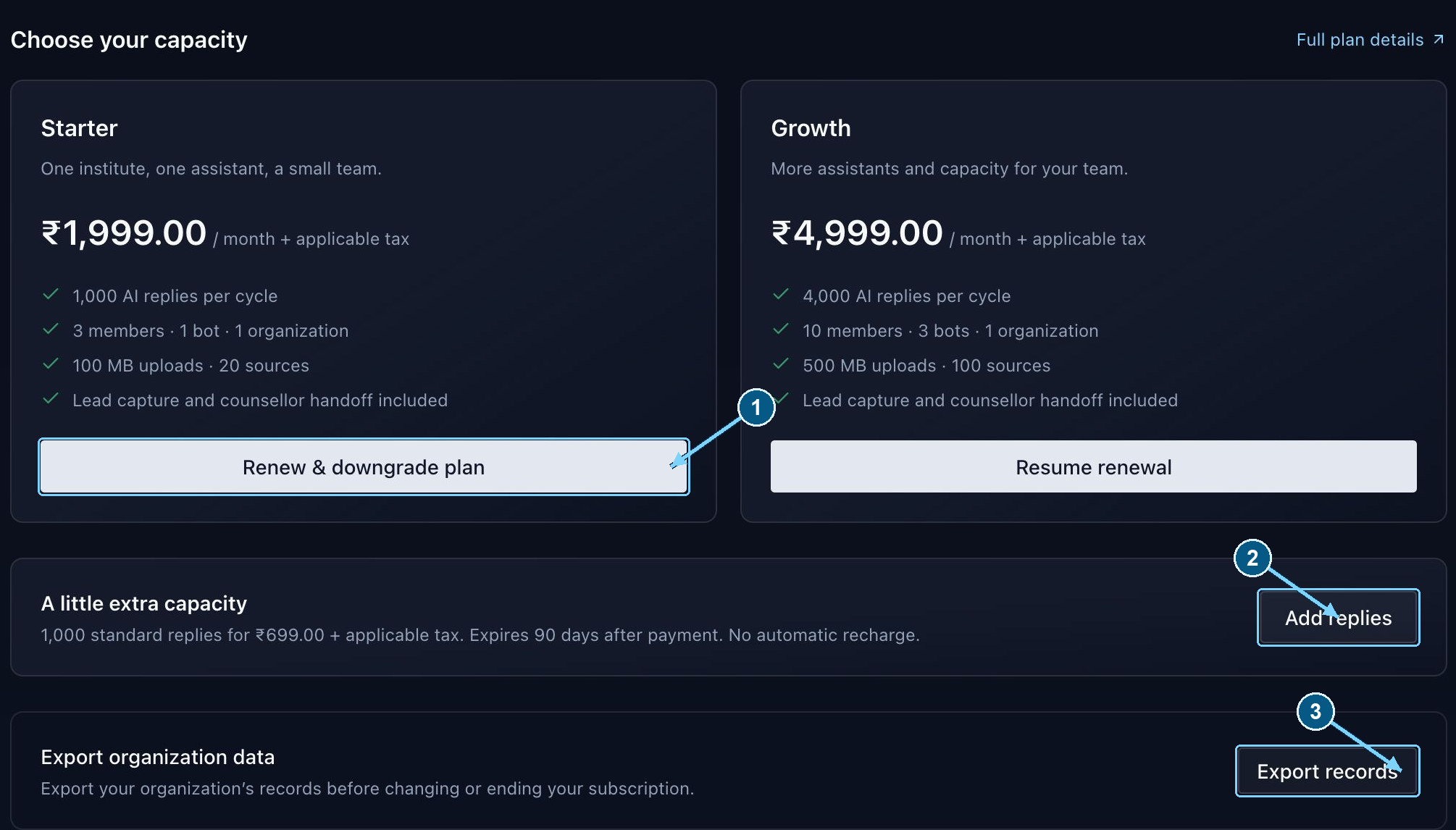
Choose capacity deliberately. Add replies increases reply capacity only.
Enlarge- Choose a plan for the next cycle
- Add a reply pack
- Download organization records
Pending or failed payments
- 1
Read the payment status
Pending, failed, dropped, or cancelled is not a successful payment. The label is there so you do not assume the students’ assistant is funded when it is not.
- 2
Refresh before retrying
Use Refresh payment status after you return from the provider. Do not pay again while confirmation is still pending.
- 3
Resolve the provider’s reason
Read why it failed and fix the method or the authorization. Use the retry action when the dashboard offers one.
- 4
Check access dates
A failed renewal can receive a three-day grace period. Trust the status and deadline on this account. That grace is not an extension for a renewal you already cancelled.
Receipts, PDF invoices, and historical details
Go to Manage billing & invoices → Payments. Receipt opens as soon as the payment is verified. Download PDF becomes available two days later. A disabled download before then is expected, not a missing invoice.
The PDF is created when you ask for it. Changing billing details does not rewrite older receipts. Sample invoices are previews. They do not change the plan or the allowance.
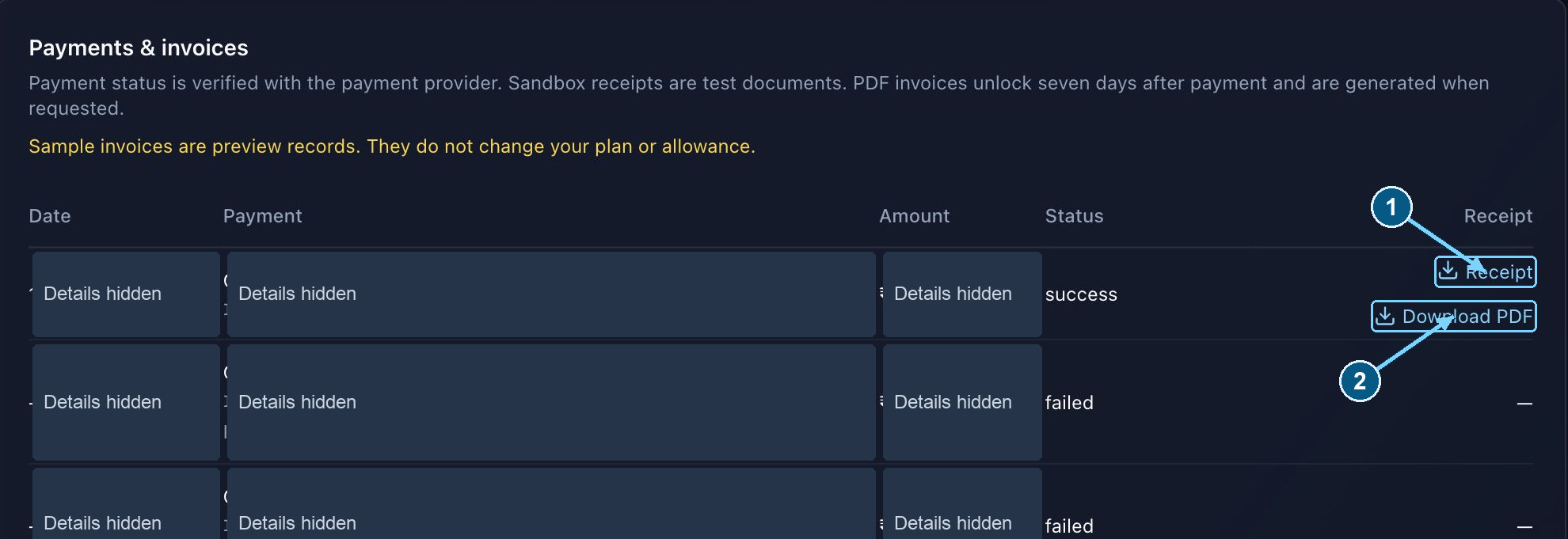
Use the status for payment confirmation. A receipt and a downloadable PDF have different availability.
Enlarge- Open the payment receipt
- Download the invoice after two days
Before cancelling, expiry, or retention cleanup
Use Subscription → Export records while you still have access. Keep approved training originals, and any follow-up your institute must retain, somewhere you control.
How long transcripts and leads stay depends on the plan. Scheduled removal warns eligible organizations at least seven days ahead. A long lapse can remove more after the recovery window. Cancelling is not an archive.